

What’s New in Hand2Note 4.1.257?

In this update, we improved how Statistics and Reports work together, added new features, and fixed several issues from previous versions.
# Jump from Statistics to Reports Without Losing Your Filters
The previous release introduced Open In Reports, which takes you from any stat directly to the matching hands in Reports.
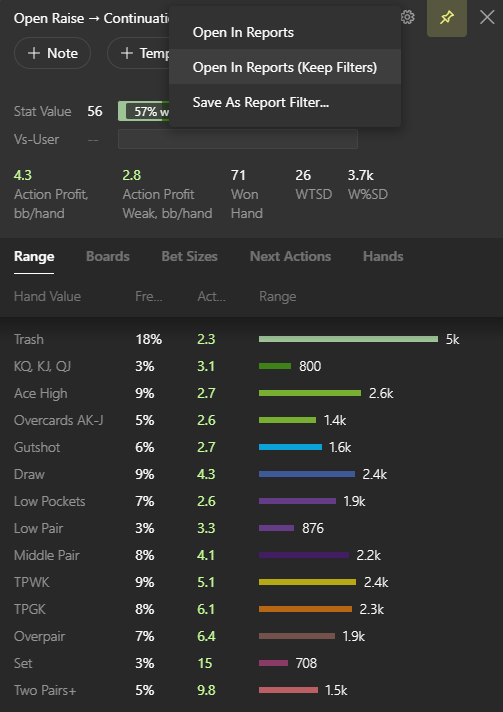
With 4.1.257, we added a new option: Open In Reports (Keep Filters). It keeps the base filters already set in Reports and only changes the Custom Filter.
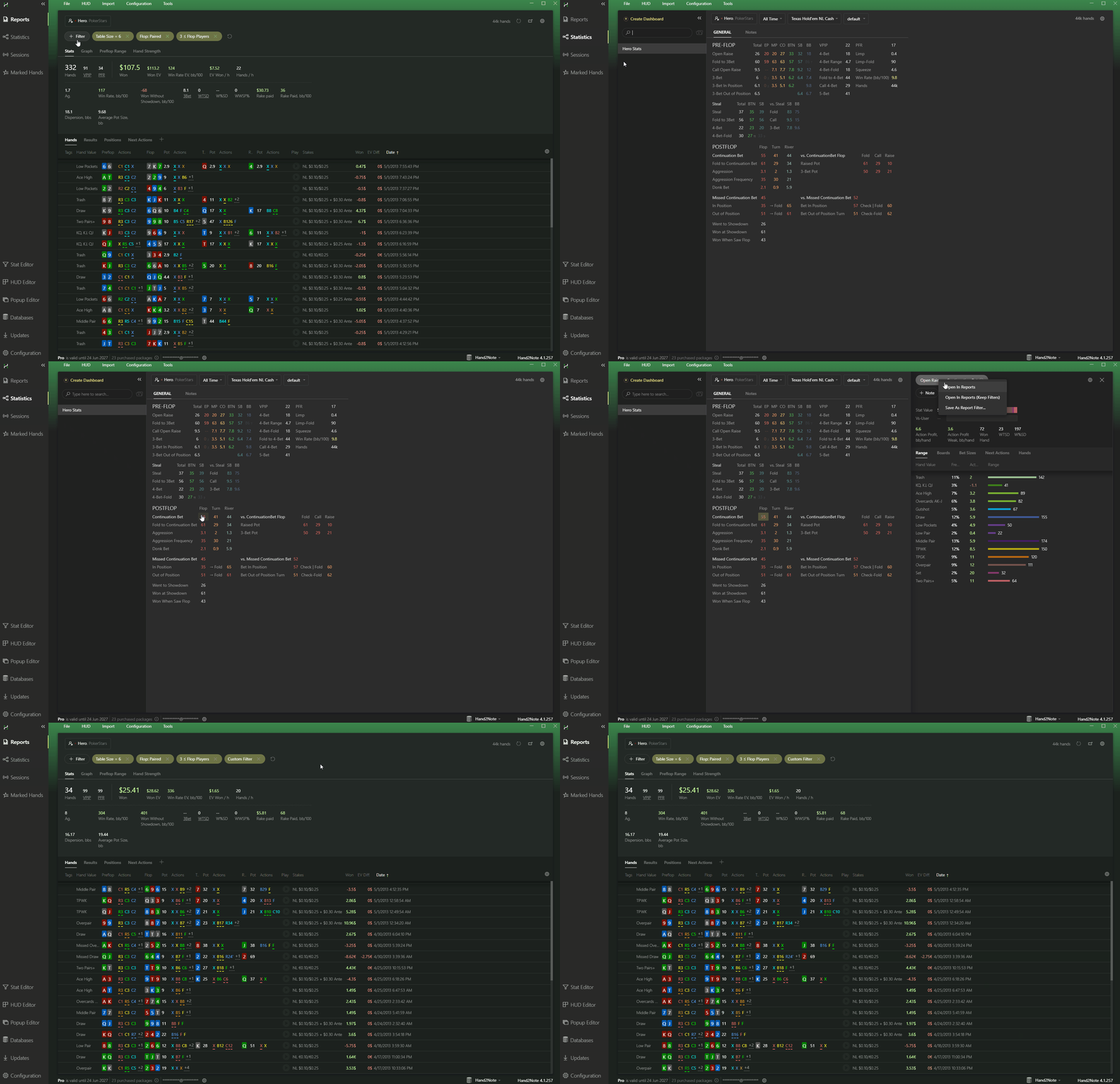
Choose Open In Reports (Keep Filters) to preserve the current base filters and add the conditions from the selected stat.
Both options are also available from stat popups.
# Search Aliases Directly in Main Popup
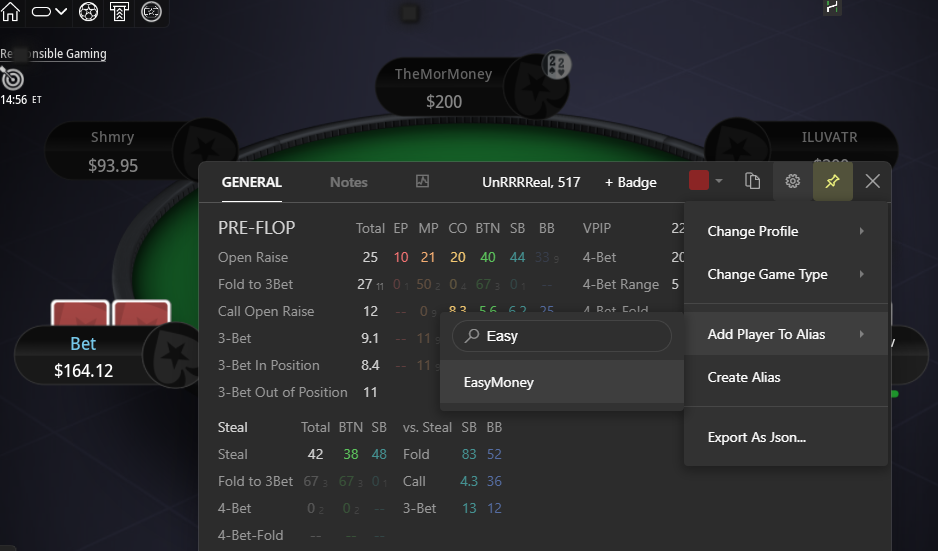
Adding players to aliases while you play is now faster. The Main Popup includes search when adding a player to an existing alias.
# Postflop Bet Sizes in Pot Percentages
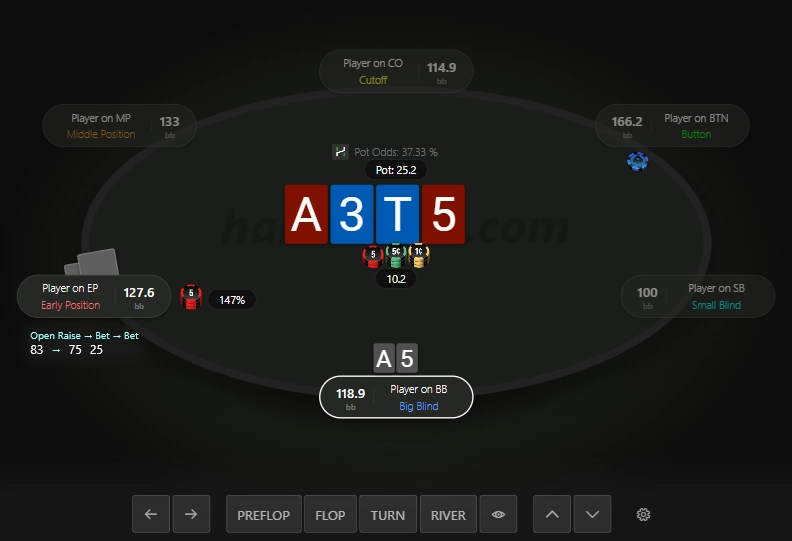
You can now display postflop bet sizes as a percentage of the pot in the Replayer.
# Clone Board Categories Across Streets
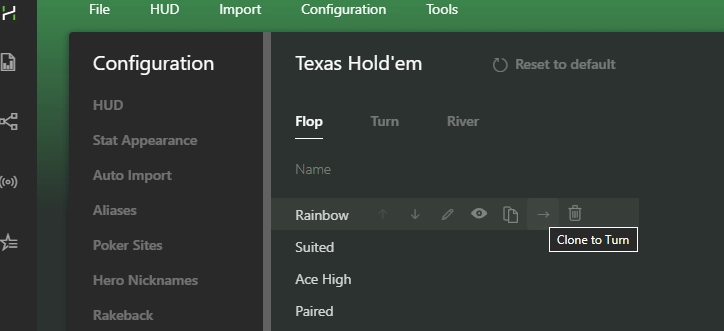
We added an option to clone board categories from one street to the next. For example, copy a flop category to the turn and adjust its conditions as needed.
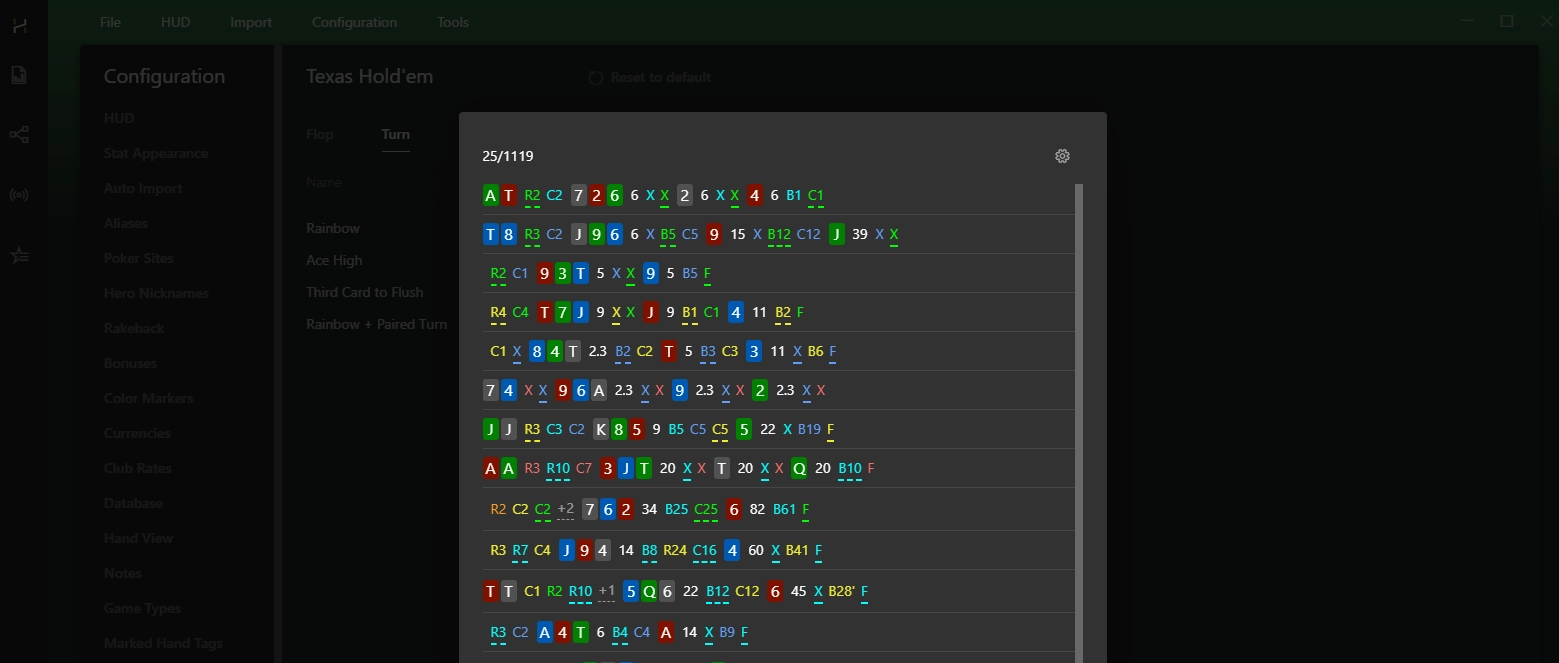
You can also test categories to make sure the filters work as expected.
# Copy Bet Sizes Between Stats
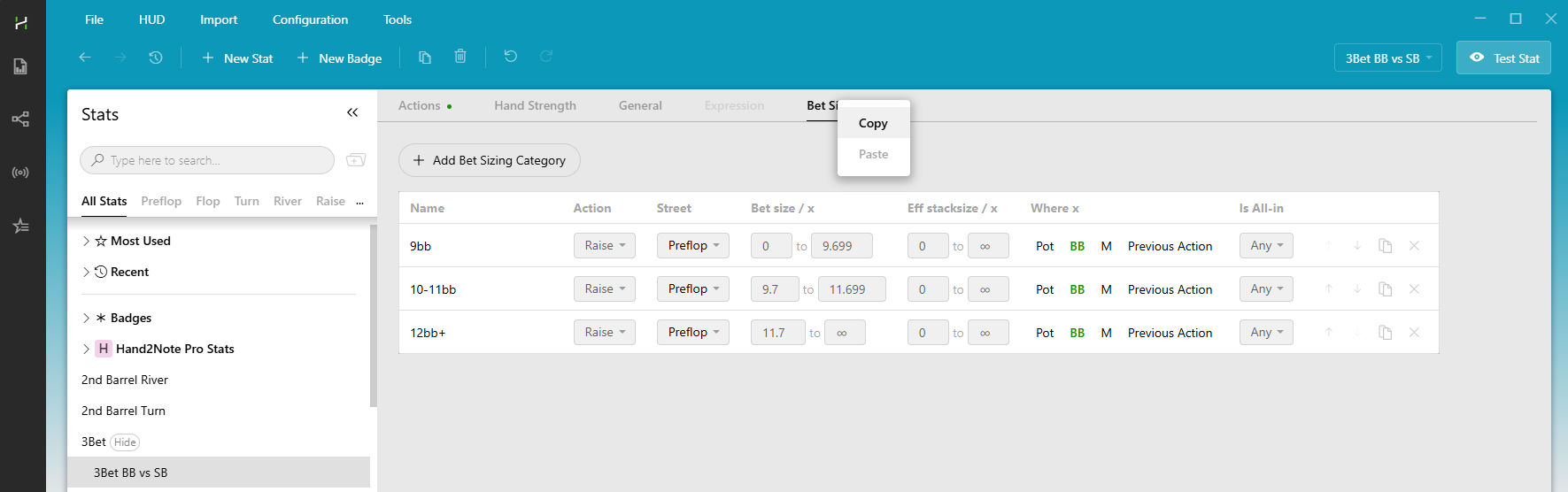
The Stat Editor now lets you copy custom bet sizes from one stat to another.
# Control Stat Sample Display
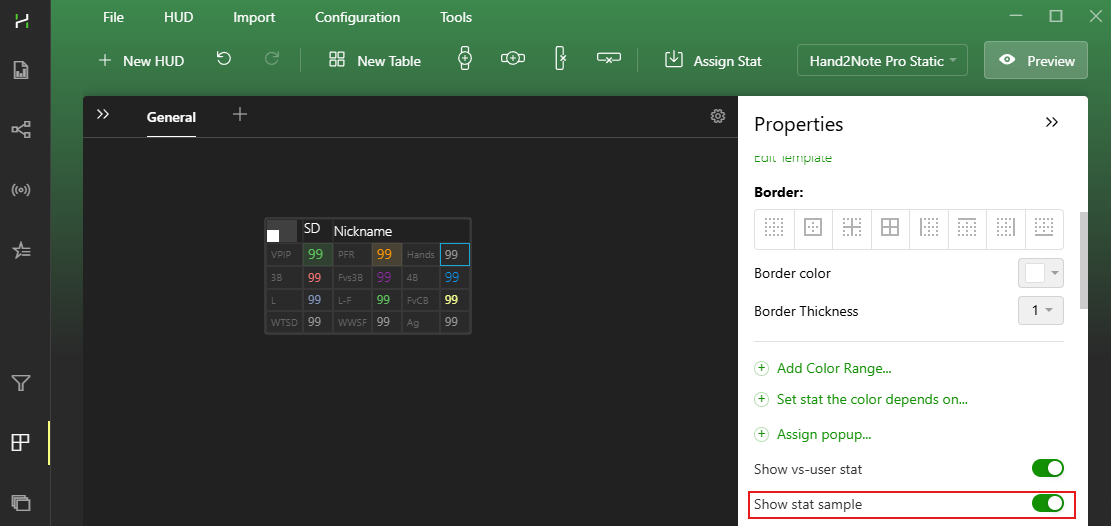
It’s now possible to configure stat samples individually in the HUD and Popup Editors.
Hide them for basic stats like Hands, VPIP, and PFR, while keeping them visible for stats, where the sample provides useful context.
# Performance & Stability Fixes
We also improved performance and fixed several issues in Hand2Note 4.1.257:
- Faster Reports. Hand2Note now finds and loads hands faster as you scroll through long lists.
- Fixed an issue with popups that could stop opening during long sessions.
- Improved CoinPoker hand imports. More hands that could previously be missed are now imported.
The update includes dozens of smaller fixes and stability improvements as well.
# Full List Of Changes
# Added:
- Statistics. Added an option to open Reports without losing existing filters.
- Config. Added ability to clone Board Categories to the turn/river.
- Config. Added ability to clone Bet Sizing Categories.
- Config. Added ability to test Hand Value and Board groups.
- Popup. Added ability to search for players when adding them to an Alias.
- Notes. Added ability to open Hand Details.
- Replayer. Added ability to display postflop bets as a percentage of the pot.
- Stat Editor. Added ability to copy/paste Bet Sizing filters.
- HUD Editor. Added option to disable stat sample display for specific stats.
- HUD Editor. Stat name is now copied when copying a stat.
# Fixed:
- Reports. Hand2Note froze when scrolling through large lists.
- Reports. Sessions. Hand2Note froze with an out-of-memory error.
- Statistics. Hands Container did not work in Assigned popups.
- Popup. Popup did not open during gameplay.
- HUD. Hud Opacity on Mouse Out option worked incorrectly on a new hand.
- Notes. Config files were exported when exporting notes.
- GG Network. Satellite tournaments were imported incorrectly.
- GG Network. Buy-in was detected incorrectly in satellite tournaments.
- Ignition. Ozoon.eu. Original hand histories were not imported.
- CoinPoker. Splash Pot hands were imported incorrectly.
- WPN. Some hands with a sitting-out player were not imported.
- PPPokerDesktop. Hotkeys did not work on the new client.
- Various minor fixes and stability improvements.
# See also
# What's New in Hand2Note 4.1.257?
In this update, we improved how Statistics and Reports work together, added new features, and fixed several issues from previous versions.
# Jump from Statistics to Reports Without Losing Your Filters
The previous release introduced Open In Reports, which takes you from any stat directly to the matching hands in Reports.
With 4.1.257, we added a new option: Open In Reports (Keep Filters). It keeps the base filters already set in Reports and only changes the Custom Filter.
Choose Open In Reports (Keep Filters) to preserve the current base filters and add the conditions from the selected stat.
Both options are also available from stat popups.
# Search Aliases Directly in Main Popup
Adding players to aliases while you play is now faster. The Main Popup includes search when adding a player to an existing alias.
# Postflop Bet Sizes in Pot Percentages
You can now display postflop bet sizes as a percentage of the pot in the Replayer.
# Clone Board Categories Across Streets
We added an option to clone board categories from one street to the next. For example, copy a flop category to the turn and adjust its conditions as needed.
You can also test categories to make sure the filters work as expected.
# Copy Bet Sizes Between Stats
The Stat Editor now lets you copy custom bet sizes from one stat to another.
# Control Stat Sample Display
It’s now possible to configure stat samples individually in the HUD and Popup Editors.
Hide them for basic stats like Hands, VPIP, and PFR, while keeping them visible for stats, where the sample provides useful context.
# Performance & Stability Fixes
We also improved performance and fixed several issues in Hand2Note 4.1.257:
- Faster Reports. Hand2Note now finds and loads hands faster as you scroll through long lists.
- Fixed an issue with popups that could stop opening during long sessions.
- Improved CoinPoker hand imports. More hands that could previously be missed are now imported.
The update includes dozens of smaller fixes and stability improvements as well.
# Full List Of Changes
# Added:
- Statistics. Added an option to open Reports without losing existing filters.
- Config. Added ability to clone Board Categories to the turn/river.
- Config. Added ability to clone Bet Sizing Categories.
- Config. Added ability to test Hand Value and Board groups.
- Popup. Added ability to search for players when adding them to an Alias.
- Notes. Added ability to open Hand Details.
- Replayer. Added ability to display postflop bets as a percentage of the pot.
- Stat Editor. Added ability to copy/paste Bet Sizing filters.
- HUD Editor. Added option to disable stat sample display for specific stats.
- HUD Editor. Stat name is now copied when copying a stat.
# Fixed:
- Reports. Hand2Note froze when scrolling through large lists.
- Reports. Sessions. Hand2Note froze with an out-of-memory error.
- Statistics. Hands Container did not work in Assigned popups.
- Popup. Popup did not open during gameplay.
- HUD. Hud Opacity on Mouse Out option worked incorrectly on a new hand.
- Notes. Config files were exported when exporting notes.
- GG Network. Satellite tournaments were imported incorrectly.
- GG Network. Buy-in was detected incorrectly in satellite tournaments.
- Ignition. Ozoon.eu. Original hand histories were not imported.
- CoinPoker. Splash Pot hands were imported incorrectly.
- WPN. Some hands with a sitting-out player were not imported.
- PPPokerDesktop. Hotkeys did not work on the new client.
- Various minor fixes and stability improvements.


