Looking for the previous version of Hand2Note? Go to Hand2Note 3 Website
Login
Download
Login

What’s New in Hand2Note 4.1.263?

Published on November 9, 2026
Some new features only work after you rebuild your statistics.

# GTO Wizard Integration

Hand2Note’s new button opens your hand in GTO Wizard so you can compare your play with the solver’s strategy in your browser.

You’ll find the button in the Replayer, Hand Details, and the right-click menu for Hand View.
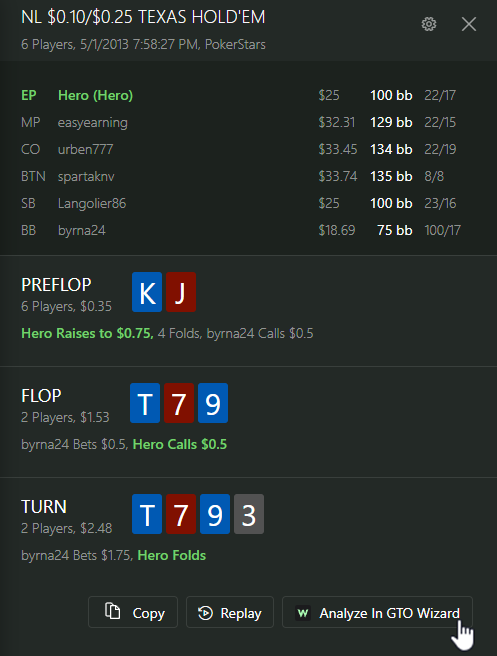
Hand Details in Hand2Note
The analysis button is in the lower-right corner of Hand Details.
Hand analysis in GTO Wizard
Hand Evaluation shows the overall rating and the breakdown by street.

For now, analysis is limited to NL Hold’em hands with Hero (you) in spots the solver supports. The GTO Wizard team plans to support more formats, such as PLO, in the future.

Even though you can only analyze completed hands from your database, Hand2Note disables the analysis button as soon as you start a session. To send a hand, end your session and restart Hand2Note.
The GTO Wizard button in the Replayer.The GTO Wizard button in the Replayer.
What is GTO Wizard? It’s a well-known poker training tool for studying game theory optimal (GTO) strategy.
The free plan lets you analyze a limited number of hands each month. Full access requires a subscription. If you’ve never paid for GTO Wizard, use promo code HAND2NOTE for 10% off your first purchase.

# Bet Sizes by Board

The Boards and Bet Sizes tabs in Statistics now show two views of the same stat. Click a board to see a player’s bet sizes, or a size to see the breakdown by board.

Click a bet size to see the Boards tab in the panel on the right.Click a bet size to see the Boards tab in the panel on the right.

To use this breakdown, rebuild your statistics with Build Bet Sizes on Boards enabled.

Look under Optimize Database Size in the Build Statistics window.Look under Optimize Database Size in the Build Statistics window.
With this option enabled, your database will use about 10% more disk space.

# Recent Filters in Reports

We’ve added Recent Filter Files to Reports. Save or load a filter and it appears in the list.

Open the menu next to Filter to find your recent files.Open the menu next to Filter to find your recent files.

You can save and load both base filters and Custom Filter settings.

In Reports, click + Filter to open the window where you can save or load a filter.In Reports, click + Filter to open the window where you can save or load a filter.

# Results by Club

The new Poker Clubs report groups your results from poker apps by club. See where you’re most profitable or export hands from a single club.

Click + next to the report tabs to add Poker Clubs.Click + next to the report tabs to add Poker Clubs.
This report covers hands played using Hand2Note 4.1. The hand history must include the club information.

# Quick Replayer Settings

Quick Replayer, which opens from Hand View, has two new settings. Use Replay Speed to adjust the pace of autoplay and Replay Size to change the window size.

Click the gear in the lower-right corner of the Replayer to open the playback settings.Click the gear in the lower-right corner of the Replayer to open the playback settings.
Scroll the mouse wheel to stop autoplay and step through the hand in either direction.

# Export Individual HUDs and Popups

The new export option lets you share a HUD or popup with a friend without sending your whole setup. Open Configuration → Export HUDs / Popups... and select the profiles you want to send.

Look for Export HUDs / Popups... just below Export Config...Look for Export HUDs / Popups... just below Export Config...

Choose which settings to include with those profiles.

Settings you can include in the export.Settings you can include in the export.
This export keeps existing protection in place and leaves unprotected stats, HUDs, and popups unlocked. Your friend still needs a valid license from the package author to use protected stats.
If you’re a package author, choose Configuration → Lock & Export Package to create a protected package instead. For details, see How to Protect Your HUD and Popups in Hand2Note.

# Other Improvements and Fixes

- macOS. The macOS update will ship separately and include HUD support for Unibet.fr.

- Updates. Choose which poker rooms get automatic updates.

- Marked Hands. The marked hands list now includes date filters.

- HUD. In all-in hands, the HUD shows equity next to the cards from the last showdown.

- Stat exports. JSON exports include more detail on bet sizes, boards, and what players do next. We also fixed export errors.

- HUD and Popup Editors. You can clone Color Range Templates and adjust postflop histograms you’ve placed manually.

- Stat Editor. For postflop stats, specify how many opponents the player acts after (in position) or before (out of position).

- Reports. Added Average Stake and Average Bet Size. You can also filter for satellite tournaments where supported.

- Hand imports. Added support for iPoker All-in or Fold. We also fixed issues with iPoker auto-import, older BetClic hand histories, and GG Network tournament summaries.

- Stability. Fixed freezes during long WPN sessions and after your computer wakes from sleep.

This update also includes many other improvements and bug fixes.

Download the latest version of Hand2Note 4.1.263.

# Read More

- What’s New in Hand2Note 4.1.262?

- What’s New in Hand2Note 4.1.257?

- How to Protect Your HUD and Popups in Hand2Note

Topics:

More "News" right into your inbox

All you need to know about improving your game with Hand2Note. Once a week. We never send any spam or ads.

More "News" right into your inbox

All you need to know about improving your game with Hand2Note. Once a week. We never send any spam or ads.

# What’s New in Hand2Note 4.1.263?

A big Hand2Note update! We’ve added GTO Wizard integration, new report features, more detailed stats by board and bet size, and other improvements.

Some new features only work after you rebuild your statistics.

# GTO Wizard Integration

Hand2Note’s new button opens your hand in GTO Wizard so you can compare your play with the solver’s strategy in your browser.

You’ll find the button in the Replayer, Hand Details, and the right-click menu for Hand View.
Hand Details in Hand2Note
The analysis button is in the lower-right corner of Hand Details.
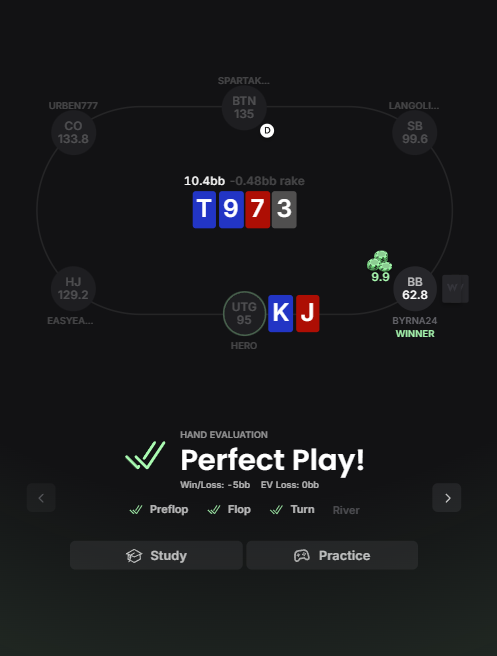
Hand analysis in GTO Wizard
Hand Evaluation shows the overall rating and the breakdown by street.

For now, analysis is limited to NL Hold’em hands with Hero (you) in spots the solver supports. The GTO Wizard team plans to support more formats, such as PLO, in the future.
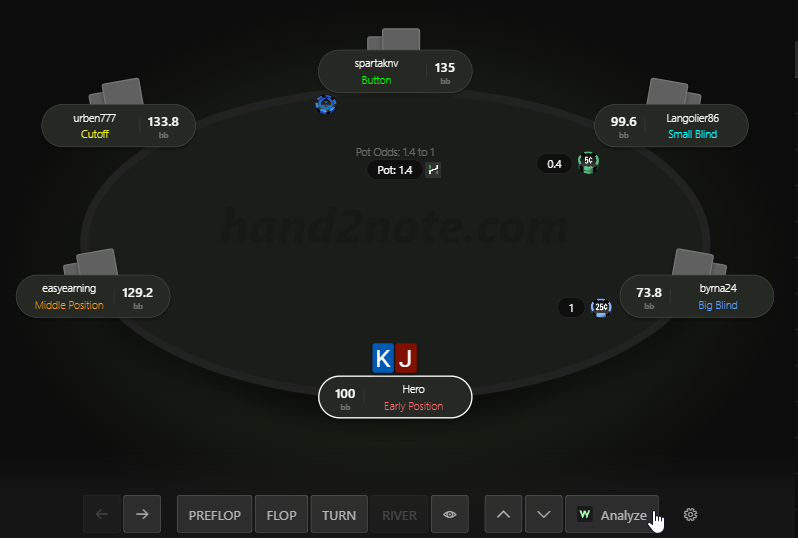
Even though you can only analyze completed hands from your database, Hand2Note disables the analysis button as soon as you start a session. To send a hand, end your session and restart Hand2Note.
The GTO Wizard button in the Replayer.The GTO Wizard button in the Replayer.
What is GTO Wizard? It’s a well-known poker training tool for studying game theory optimal (GTO) strategy.
The free plan lets you analyze a limited number of hands each month. Full access requires a subscription. If you’ve never paid for GTO Wizard, use promo code HAND2NOTE for 10% off your first purchase.

# Bet Sizes by Board

The Boards and Bet Sizes tabs in Statistics now show two views of the same stat. Click a board to see a player’s bet sizes, or a size to see the breakdown by board.
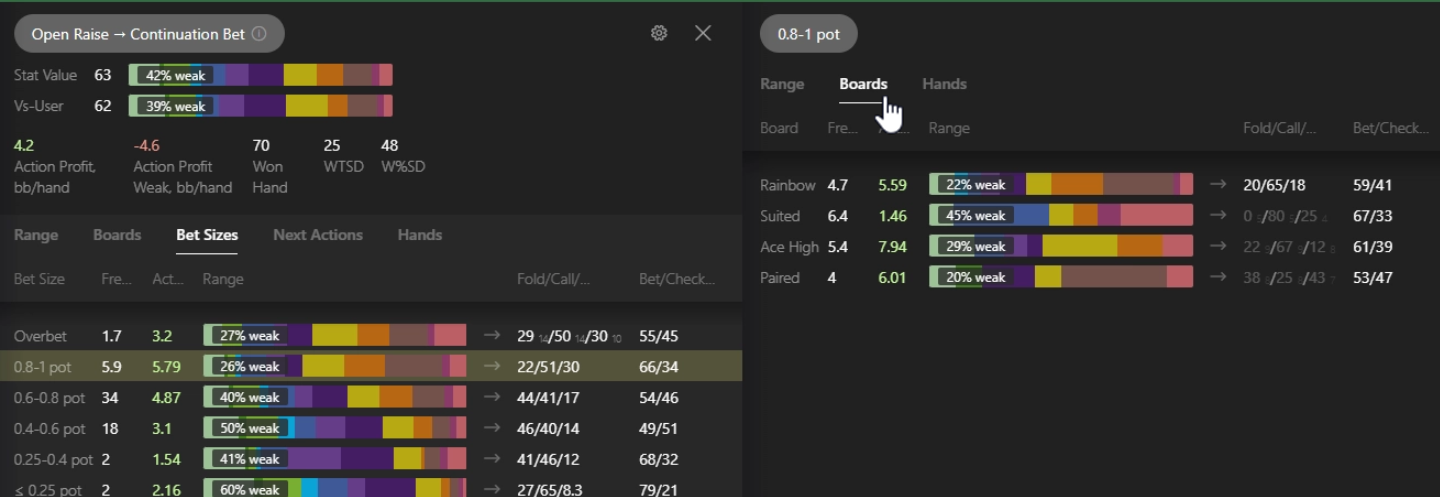
Click a bet size to see the Boards tab in the panel on the right.Click a bet size to see the Boards tab in the panel on the right.

To use this breakdown, rebuild your statistics with Build Bet Sizes on Boards enabled.
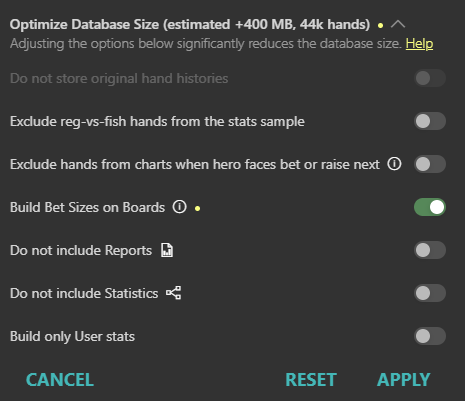
Look under Optimize Database Size in the Build Statistics window.Look under Optimize Database Size in the Build Statistics window.
With this option enabled, your database will use about 10% more disk space.

# Recent Filters in Reports

We’ve added Recent Filter Files to Reports. Save or load a filter and it appears in the list.
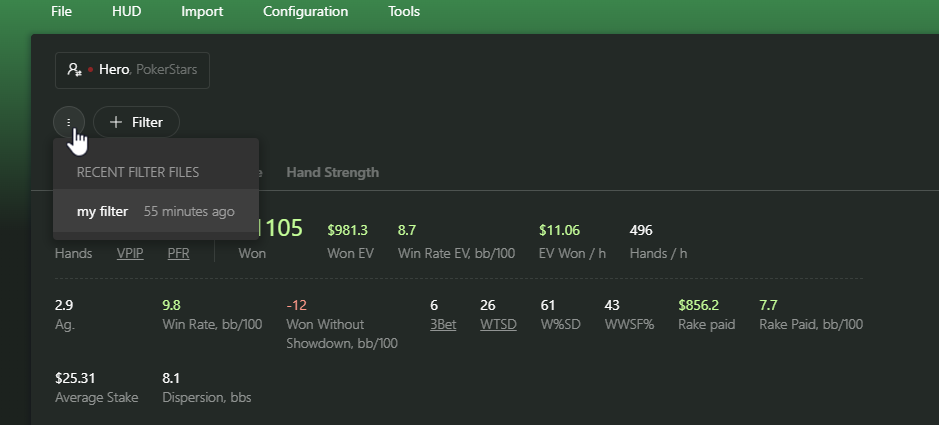
Open the menu next to Filter to find your recent files.Open the menu next to Filter to find your recent files.

You can save and load both base filters and Custom Filter settings.

In Reports, click + Filter to open the window where you can save or load a filter.In Reports, click + Filter to open the window where you can save or load a filter.

# Results by Club

The new Poker Clubs report groups your results from poker apps by club. See where you’re most profitable or export hands from a single club.
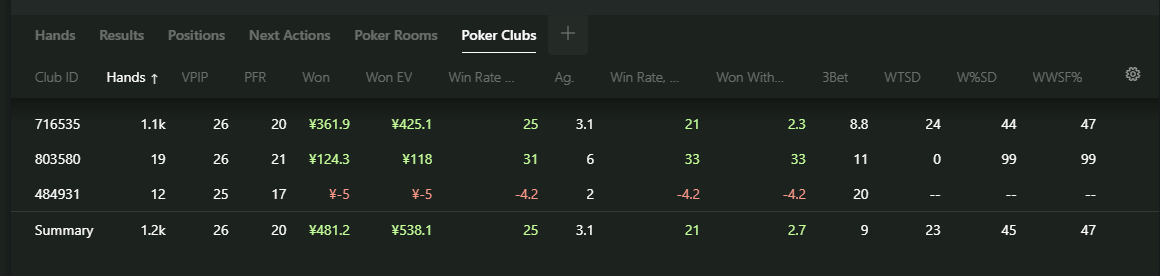
Click + next to the report tabs to add Poker Clubs.Click + next to the report tabs to add Poker Clubs.
This report covers hands played using Hand2Note 4.1. The hand history must include the club information.

# Quick Replayer Settings

Quick Replayer, which opens from Hand View, has two new settings. Use Replay Speed to adjust the pace of autoplay and Replay Size to change the window size.
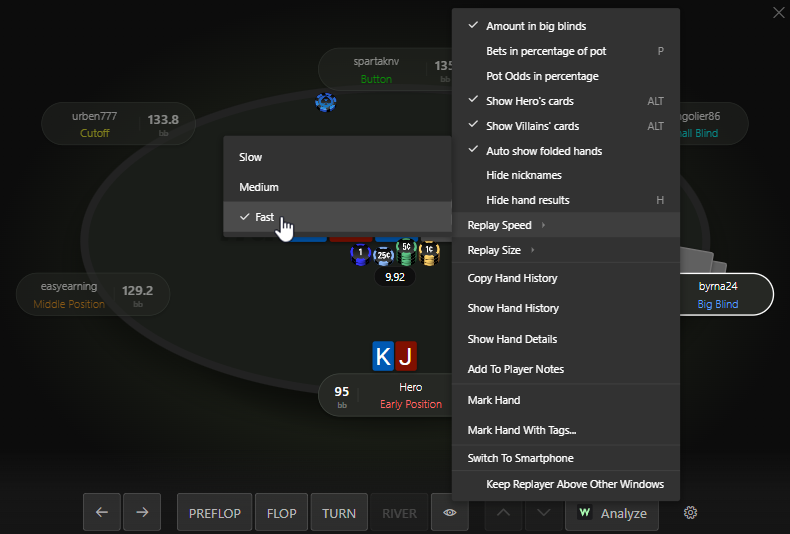
Click the gear in the lower-right corner of the Replayer to open the playback settings.Click the gear in the lower-right corner of the Replayer to open the playback settings.
Scroll the mouse wheel to stop autoplay and step through the hand in either direction.

# Export Individual HUDs and Popups

The new export option lets you share a HUD or popup with a friend without sending your whole setup. Open Configuration → Export HUDs / Popups... and select the profiles you want to send.
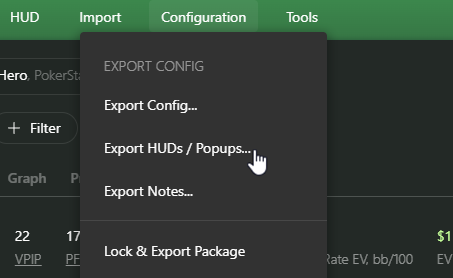
Look for Export HUDs / Popups... just below Export Config...Look for Export HUDs / Popups... just below Export Config...

Choose which settings to include with those profiles.
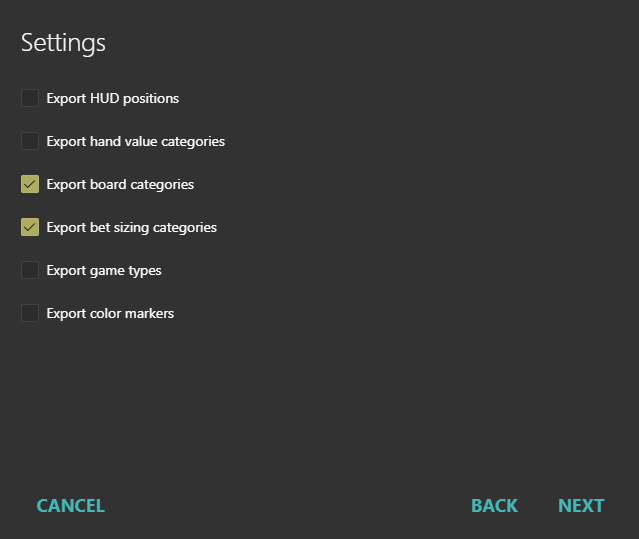
Settings you can include in the export.Settings you can include in the export.
This export keeps existing protection in place and leaves unprotected stats, HUDs, and popups unlocked. Your friend still needs a valid license from the package author to use protected stats.
If you’re a package author, choose Configuration → Lock & Export Package to create a protected package instead. For details, see How to Protect Your HUD and Popups in Hand2Note.

# Other Improvements and Fixes

- macOS. The macOS update will ship separately and include HUD support for Unibet.fr.

- Updates. Choose which poker rooms get automatic updates.

- Marked Hands. The marked hands list now includes date filters.

- HUD. In all-in hands, the HUD shows equity next to the cards from the last showdown.

- Stat exports. JSON exports include more detail on bet sizes, boards, and what players do next. We also fixed export errors.

- HUD and Popup Editors. You can clone Color Range Templates and adjust postflop histograms you’ve placed manually.

- Stat Editor. For postflop stats, specify how many opponents the player acts after (in position) or before (out of position).

- Reports. Added Average Stake and Average Bet Size. You can also filter for satellite tournaments where supported.

- Hand imports. Added support for iPoker All-in or Fold. We also fixed issues with iPoker auto-import, older BetClic hand histories, and GG Network tournament summaries.

- Stability. Fixed freezes during long WPN sessions and after your computer wakes from sleep.

This update also includes many other improvements and bug fixes.

Download the latest version of Hand2Note 4.1.263.

# Read More

- What’s New in Hand2Note 4.1.262?

- What’s New in Hand2Note 4.1.257?

- How to Protect Your HUD and Popups in Hand2Note

Topics:

More "News" right into your inbox

All you need to know about improving your game with Hand2Note. Once a week. We never send any spam or ads.

More "News" right into your inbox

All you need to know about improving your game with Hand2Note. Once a week. We never send any spam or ads.
Published on November 9, 2026
All posts by Ruslan Khakimov

Hand2Note support is always here

Do you have any question? We are always ready to help.